

Where your data goes
Who this is for: admins, approvers and security reviewers who need to know where a workflow’s data goes before it runs.
Before you start: nothing. To run workflows in your own network, see Run automations in your own environment.
Every workflow version has a data path. It answers four questions about that exact version, in plain words. You find it under Where your data goes on the workflow’s Overview tab and on the approval page.
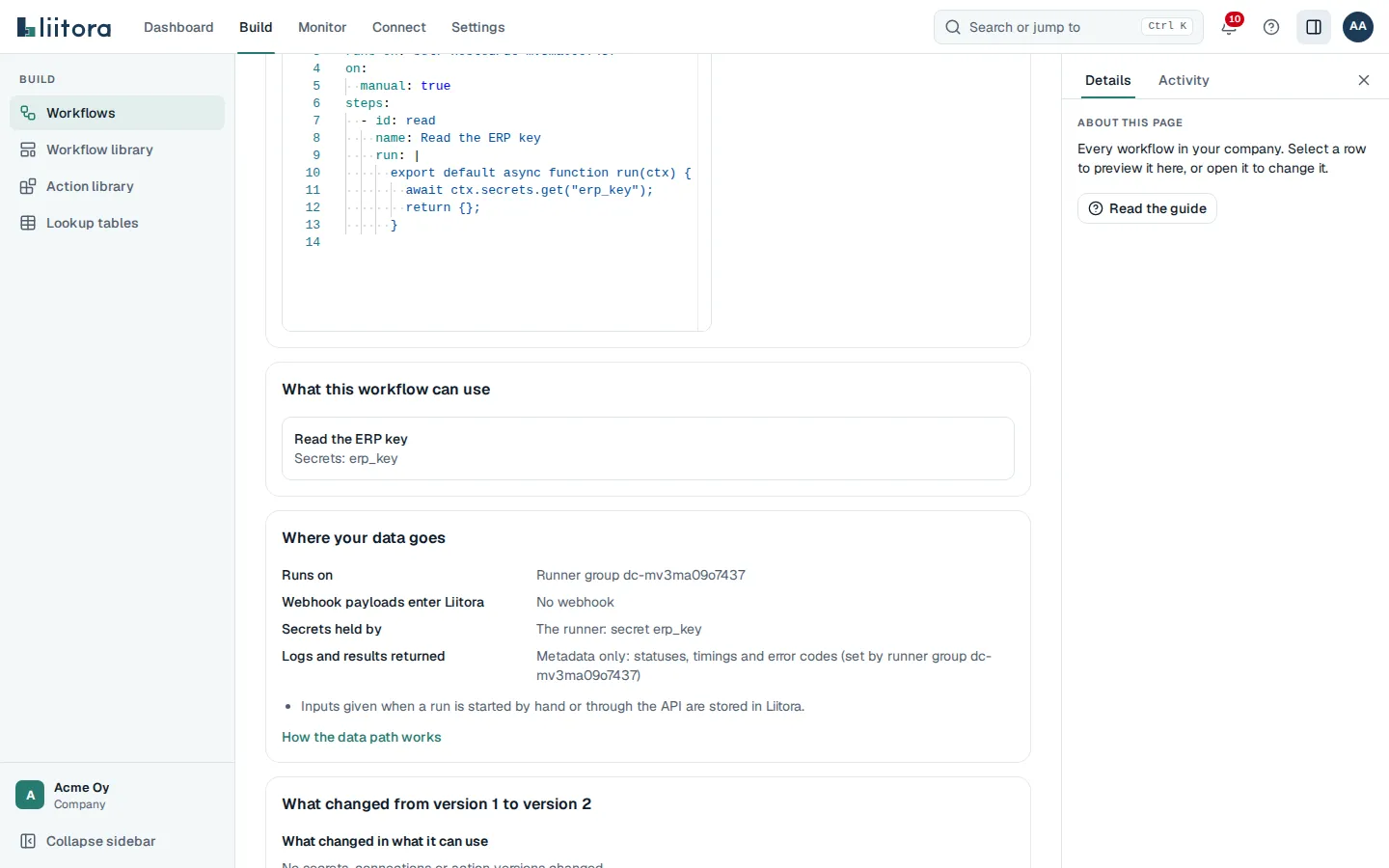
The four questions
Section titled “The four questions”| Question | Possible answers |
|---|---|
| Runs on | Liitora, or Runner group and its name, when the workflow says runs-on: self-hosted/<group>. |
| Webhook payloads enter Liitora | Yes, with the webhook endpoint that receives them. No, received by the runner, with the endpoint, when a runner workflow’s webhook trigger has receive: runner. No webhook, when the workflow has no webhook trigger. |
| Secrets held by | Liitora, The runner, Both or No secrets, with the names of the secrets, the connections whose credentials are used, and the webhook endpoint whose secret checks deliveries. |
| Logs and results returned | Full, with secrets masked, or Metadata only: statuses, timings and error codes. On a runner group it can also say Needs a new approval or Not known, see When the runner group changes. |
The data path shows names only, never secret values.
Where it comes from
Section titled “Where it comes from”Nobody types the data path, and it is never stored on its own. Liitora works it out from the version each time you look:
- Runs on comes from
runs-on. - Webhook payloads comes from the
webhooktrigger. - Secrets held by comes from what the version can use: the secrets its scripts read, the connections its steps use, and the webhook endpoint.
- Logs and results returned comes from the runner group’s setting What the runners send back. On Liitora it is always Full, with secrets masked.
Because it comes from the version, you can’t change the data path without saving a new version. A new version needs passing tests and a person’s approval before it runs, so nobody can move a workflow’s data without someone seeing it.
When you compare two versions, What changed in where the data goes lists each answer that differs, for example “Runs on changes from “Liitora” to “Runner group on-prem”.” You see the same list on the approval page.
Workflows on Liitora
Section titled “Workflows on Liitora”Everything happens in Liitora: the runs, the secrets and connection credentials, the webhook deliveries, the logs and the results. Logs and results show secret values masked.
Workflows on a runner
Section titled “Workflows on a runner”The runner in your network runs the steps, so most data stays with you:
- The secrets the scripts read and the credentials of the connections the steps use come from the runner’s own settings, never from Liitora.
- What comes back depends on the runner group. With Metadata only, step data, results, error messages and logs stay in your network.
Some data still passes through Liitora, and the data path says so:
- Webhooks: Liitora receives the delivery, checks it with the webhook endpoint’s secret and hands the payload to the runner. So the payload enters Liitora, and Liitora holds that endpoint’s secret. That is why such a workflow shows Both under Secrets held by. To keep the payload out of Liitora, let the runner receive the webhook, see below.
- Poll triggers: Liitora checks the connection for new items, so it holds that connection’s credentials and the items pass through Liitora.
- Inputs: inputs given when a run is started by hand or through the API are stored in Liitora.
Webhooks the runner receives
Section titled “Webhooks the runner receives”With receive: runner on the webhook trigger, the runner receives the delivery itself, behind your own proxy. It checks the signature with a secret only it holds and keeps the payload in a private folder on its machine for 14 days unless you set another time. Liitora learns only that a delivery arrived: an event id, the endpoint, the time, the body’s size in bytes and salted hashes that let it recognise a repeat. The body and the headers never enter Liitora. The data path says No, received by the runner, and the runner holds the endpoint’s secret. See Receive webhooks inside your network.
When the runner group changes
Section titled “When the runner group changes”What the runners send back belongs to the runner group, not to the workflow. The data path names the group it comes from, for example Metadata only: statuses, timings and error codes (set by runner group on-prem).
You can’t change the setting of an existing group, but you can remove the group and add it again with another setting. So when a person approves or activates a version, Liitora records what the group sends back at that moment. Runs then follow these rules:
- The group now sends back more (everything, when the version was approved with metadata only): the data path says Needs a new approval, activating is refused, and runs fail with
return_mode_not_approvedbefore anything is sent to the runner. To allow it, save the workflow again and approve the new version. The comparison shows the change under Logs and results returned. - The group now sends back less (metadata only, when the version was approved with everything): runs go ahead, and the data path says the group sends back less than the version was approved with.
- The group was added again with the same setting: nothing changes, and runs go ahead.
- The group is missing: the data path says Not known, the runs wait until the group exists again, and nobody can approve or activate the version until then.
Once a version was approved with metadata only, it stays that way, even after a later approval. The audit log shows when a group was removed and added, and which setting each approval saw.
For AI assistants and the API
Section titled “For AI assistants and the API”- The API returns the data path as
data_pathon the workflow, and the changes asdata_path_changeswhen you compare two versions.data_path.approved_return_modeis what the runner group sent back when the version was approved (fullormetadata), andlogs_returnedisneeds_approvalwhen the group now sends back more. - The AI assistant tool
get_workflowreturns the samedata_path, anddata_path_changescompared with the version before. See get_workflow.